
Find Display mode
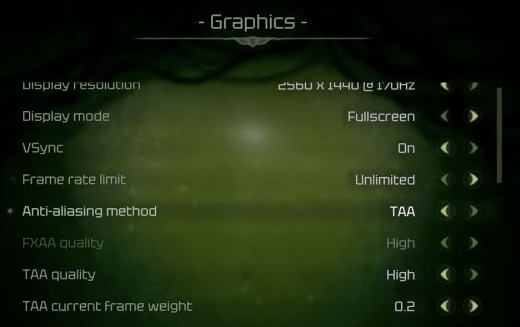
In the PC 1.0.0 Graphics screen, Display mode appears directly below Display resolution and above VSync. Resolution and display mode are separate settings.
- Open the game’s Graphics settings.
- Find Display mode, between Display resolution and VSync.
- Select Fullscreen, Windowed Fullscreen or Windowed, depending on the presentation you want.
Fullscreen and ultrawide are separate
Choosing Fullscreen does not add native ultrawide support. If you are using a 21:9 or 32:9 screen, read Moadra’s ultrawide support status.